Jedox & Qlik Sense
When it comes to planning, there are two questions that everyone asks: How can I bring my data from a BI tool into Jedox for planning? How can I integrate my Jedox planning into the analyses/dashboards I already have in BI?
Let’s see how Jedox SaaS and Qlik Sense SaaS, one of the most popular Business Intelligence tools, can communicate with each other with a real data exchange.
It is possible to establish a constant dialogue for the exchange of data directly within the two tools, without having to setup temporary cloud spaces/archives where unnecessary data files are created and read to connect the two products.
The Jedox <-> Qlik Sense SaaS dialog is bidirectional, allowing Jedox to pull data directly from Qlik Sense and Qlik Sense to pull data directly from Jedox.
Usually, to put two tools in communication, whatever they may be, files are used (often in csv format) where one tool creates them and the other tool reads them and this is how the dialogue is simulated.
This strategy exposes the company to several problems and risks:
- Logistics: you need to find a cloud space to store these data files that is compatible with both tools (!! Not all tools have read/write connectors for cloud spaces!!)
- Security: files with sensitive data on the network
- Infrastructure: IT dept. must prepare an architecture involving a third party (cloud) to have synchronized environments
Now, let’s forget all that, the Jedox <-> Qlik Sense SaaS dialogue has these advantages:
- Logistics: it does not use any files for data exchange and no storage space to be set up
- Security: true dialogue, true data exchange, directly within the tools
- Infrastructure: environments always automatically synchronized, without manual activities, with the latest data updated in each system
All this is possible thanks to the technologies that Jedox makes available:
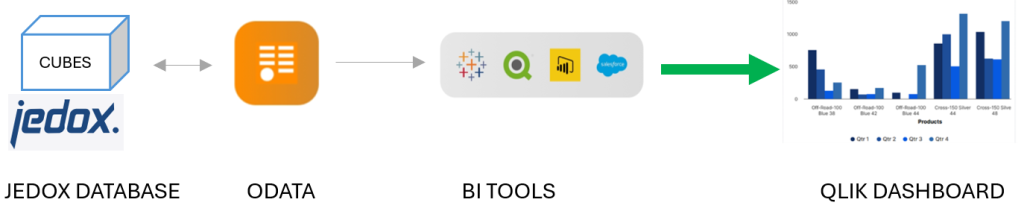
1) OData: through this protocol Jedox allows any BI tool, in this case Qlik Sense SaaS, to connect via REST calls and extract data in JSON format.
JEDOX <-- BI TOOLS
figure 1
2)Qlik Connector: through this connector, Jedox creates a connection to Qlik Sense SaaS to extract, using the classic Jedox ETL tool, the application data in Qlik Sense and it is then saved within its databases (cubes).
JEDOX --> BI TOOLS (QLIK SENSE SAAS)
figure 2

Let’s see how, at a high level, the Jedox <-> Qlik Sense SaaS two-way dialogue is set up.
Let’s start with the dialogue in figure 1, through which Qlik Sense SaaS connects to Jedox and extracts the data, without having to generate intermediate files.
In the Qlik application it is necessary:
1)Create a standar REST connection, specifying all the information about your Jedox cloud environment. This information can be easily found in the Jedox administration console.
2)Create a simple SQL query in your Qlik application script to extract data from Jedox via REST (an example of an extract query, generated directly from Qlik)

3)Once the above query is run and the data is extracted, we proceed with normal Qlik modeling to integrate the Jedox data into the existing Qlik data model and subsequent analyses/dashboards
Let’s now look at the dialogue in figure 2, through which Jedox connects to Qlik Sense SaaS, without intermediate files:
- In Qlik Sense SaaS, an API key must be generated from the management console. This key allows Jedox to securely connect to Qlik Sense SaaS.
- In Jedox, create a new connection of type QlikSaaS within the reference ETL project
- In Jedox, configure the connection with the Qlik Sense SaaS address and the API key generated previously
- Continue with the Jedox ETL by creating a Qlik type extraction, specifying the Qlik Sense app and the data model table in Qlik


With these steps it is possible to establish a real dialogue and exchange of data between Jedox and Qlik Sense SaaS, thus allowing Jedox to use Qlik data for planning setup, and vice versa allowing Qlik to read the planning data and easily integrate it into dashboards.
To have both environments automatically synchronized every day, there is one last step to implement.
In Qlik Sense SaaS, you can create automation that not only schedules Qlik application updates, but also runs Jedox ETLs.
The synchronization is therefore set up like this:
- Automation updates the Qlik app, with the script reading the Jedox data via REST calls
- The automation runs the Jedox ETL, with the QlikConnector reading the data from Qlik Sense SaaS
To summarize, with just a few steps and leveraging Jedox technologies, it is possible to exchange data between Jedox and Qlik Sense SaaS.
Author: Fabio Miotto – HiBI Jedox Product Specialist


